

Law firms
Bad-lead disputes and Google Verified professional-account review.

Psst… keep us in your Google corner.
Add PrimeLSA on GooglePrimeLSA helps local businesses, multi-location franchisees and agencies manage Google Local Services Ads and review what changed before making account edits.
Built around a focused LSA account review: visibility, lead quality, calls, replies, reviews, and account health.
Advantage by PrimeLSA
Your Google LSA account
Visibility
Changed since last reviewLead flow
Movement detectedAccount edits
No recent changesYour Google LSA account
Missed calls
Review follow-upMessage replies
Check coverageLead quality
Context availableYour Google LSA account
Verification
StableReviews
HealthyAccount status
No issuesAccount structures
What is PrimeLSA?
Both paths help teams understand what changed before editing an LSA account. Manage LSA with PrimeLSA, or use Advantage to review visibility, leads, calls, replies, reviews, and account health before making changes.
Management
Google Local Services Ads strategy and account support.
Advantage
Visibility, lead flow, calls, replies, reviews, and account health.
Review before editing
Budget, categories, disputes, messages, and profile details.
Google Local Services Ads
PrimeLSA provides Google Local Services Ads management and account review for local service businesses, multi-location operators, franchisees, and agencies.
Industries
Bad-lead disputes and Google Verified professional-account review.
Lead quality and local visibility review.
Call quality and service-area performance.
Spam calls and out-of-area leads.
Demand shifts and service-area performance.
Urgent-call response and lead quality.
Local demand and missed-call review.
Seasonal demand and response performance.
Emergency leads and service-area fit.
Seasonal leads and local coverage.
Business models
LSA problem diagnosis
Google Local Services Ads visibility, rankings, lead quality, and account stability can shift without an obvious cause. Advantage helps surface what changed before you make blind edits.
Explore common LSA problemsChoose the symptom. Keep the account review controlled.
Placement and lead volume feel unstable even though the account appears active.
Review this issueCheck public presence
Review service areas
Confirm account status
LSA services
Start with the problem affecting lead flow, then choose the service path that matches the account work. This keeps visibility, disputes, calls, and intake connected to the decision in front of your team.
Service routing
Advantage command center
Advantage turns scattered Google Local Services Ads movement into a focused account review, so owners and agencies know what deserves attention before changing campaigns or budgets.
The first step is not more noise. It is a cleaner review of what moved and what needs attention next.
Lead volume
Movement foundResponse path
Needs reviewAccount health
Check accountAccount review
Example plumbing account
Review movement
Example roofing account
Stable
Example legal intake
Needs attention
Example moving account
Monitor lead volume
What moved
Review the account view before the next operational decision.
Where to inspect
Review the account view before the next operational decision.
What to review next
Review the account view before the next operational decision.
Real account review work
Customer feedback
PrimeLSA helped us understand our Google Local Services Ads account instead of guessing. Advantage gave us one place to review what changed before making decisions.
Local service business owner
4.8/5 from 336 Google reviews
From accounts managed by PrimeLSA.
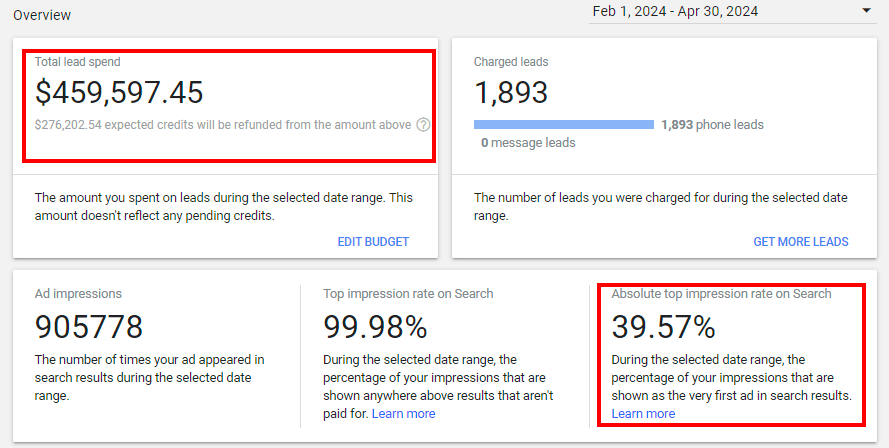
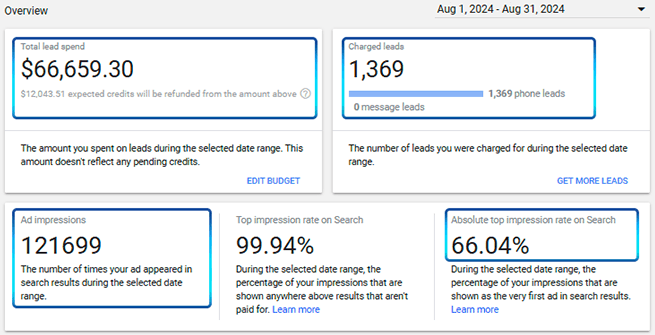
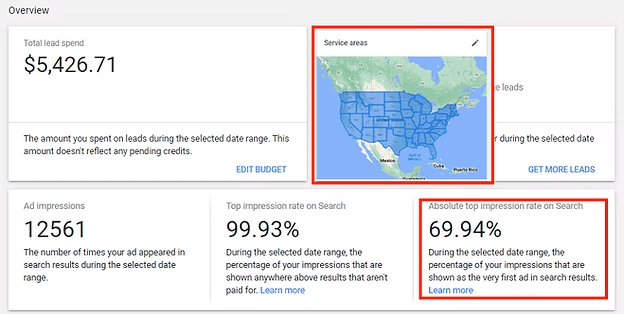
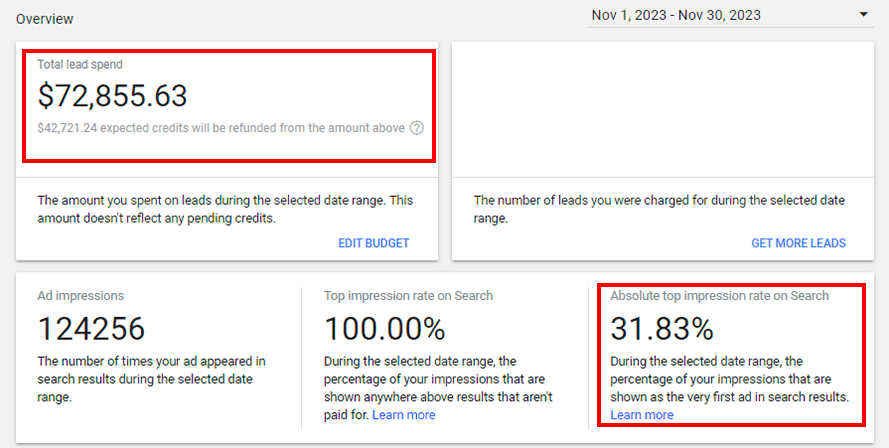
Law firm review
Clear next step
“The best part was knowing what to check next. It helped me understand where to focus.”
Owner review
Account clarity
“It helped me separate real account issues from normal slow days. That was the biggest value for me.”
Agency review
Faster client check-in
“For client check-ins, this gives me a cleaner starting point. I can explain the account without pulling five screenshots.”
Location review
Follow-up ready
“We could tell which accounts needed a closer look and which ones were mostly fine.”
Budget review
Less guessing
“I stopped guessing whether the issue was budget, calls, or visibility. The review gave me a better place to start.”
Response review
Response issues visible
“The calls and messages were easier to review in one place. It showed us where leads could be slipping through.”
Operator review
Less clicking
“I finally had a simple way to see where the account needed attention instead of clicking through everything myself.”
Change review
Less random changes
“It gave us a cleaner way to review the account instead of making random changes and waiting to see what happened.”
Client account review
Earlier warning
“It helps me catch what changed before the client asks. That alone makes the review process feel more organized.”
Operations review
Follow-up list
“It helped us turn account review into a simple follow-up list. Calls, messages, visibility, and account health were easier to sort.”
Lead drop review
First thing to check
“The account review helped us move from leads are down to here is what we should look at first.”
Intake review
Better lead handling
“It helped our office see where the account needed better handling, not just more spend.”
Lead-flow clarity
See where lead flow broke down before reacting to a slow week.
Budget confidence
Know what deserves attention before changing spend or profile settings.
Agency explanation
Give clients a cleaner explanation when performance shifts.
Plan budgets with the Google Local Services Ads cost calculator, then use Advantage to review what changed once lead flow starts moving.
Monitor account movement across clients without opening every Google Local Services Ads account blindly.
Client watchlist
Weekly review
Account view
Resources
Start with the question the account is raising, then move to the right guide, tool, or product page before making changes.
View blogNew guidance on account changes, lead quality, reporting, and channel decisions.
Stop waiting. Start reviewing.
Run a cleaner Google Local Services Ads review with Advantage by PrimeLSA.